The widget (fig. 1) allows showing the rating of the product presented with stars.
Fig. 1. Product Rating Widget.
Along optionally with number of reviews (fig. 2).

Fig. 2. Visualization of The7 Product Rating.
Content
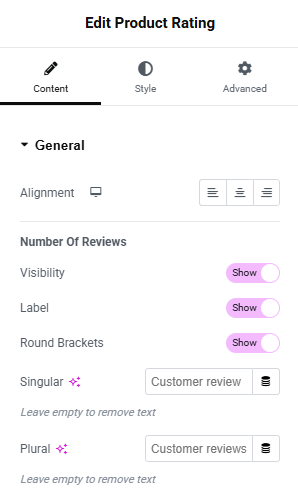
Fig. 3. The7 Product Rating Content Tab Settings.
Content tab (fig. 3) includes the following settings:
- alignment of the rating (left/right/center);
- appearance of the number of reviews;
Number Of Reviews section allows to configure:
- visibility (show/hide);
- label (show/hide);
- round brackets (show/hide);
- text label when there’s single review (leave empty to hide);
- text label when there’re more reviews (leave empty to hide);
Style
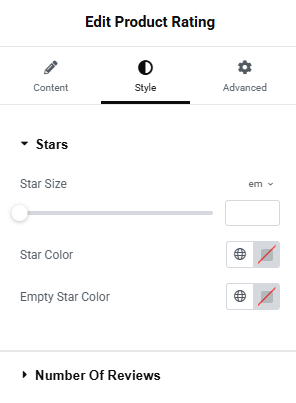
Fig. 4. The7 Product Rating Style Tab Settings.
Style tab (fig. 4) allows to configure the appearance of the following elements:
Stars section includes the following settings:
- star size;
- star color;
- empty star color;
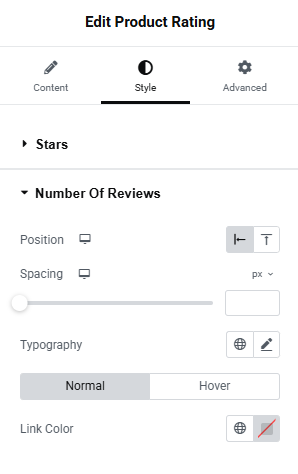
Fig. 5. The7 Product Rating Style Tab Number Settings.
Number Of Reviews section (fig. 5) allows to configure:
- position (above the stars/on the right side of the stars);
- spacing (between the number and the stars);
- typography;
- color (normal/hover) – the number is a link that leads to list of reviews;
Advanced
The advanced section contains standard Elementor settings. More info is available here.