The Post taxonomy widget (fig. 1.1) allows inserting post taxonomies (categories, tags, etc) into the posts.
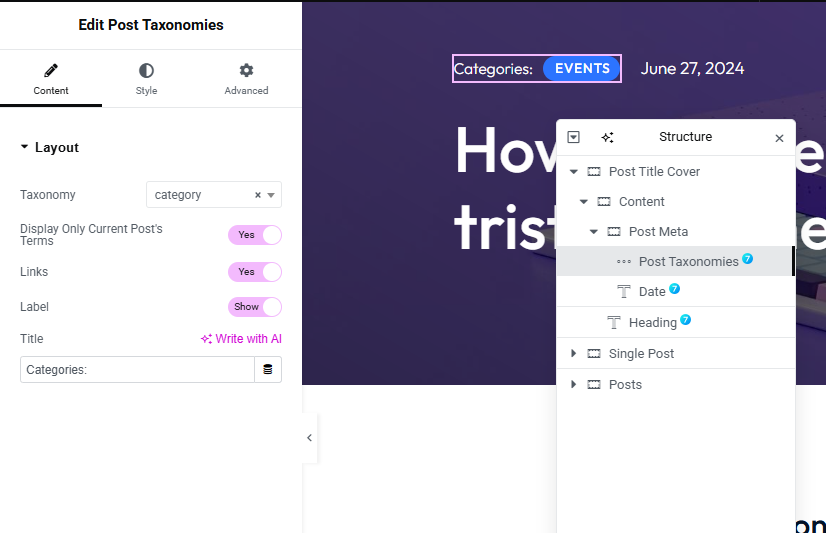
Fig. 1.1. The7 Post Taxonomies Widget.
Content
You can find the following settings under the “Layout” tab (fig. 1.1):
- Taxonomy: Select the taxonomy to display;
- Display Only Current Post’s Terms: choose weather to display all taxonomies or taxonomies of the current posts;
- Links: Link the taxonomy to taxonomy archive page;
- Label: Enable label before the taxonomy;
- Title: Enter the label Title;
Style
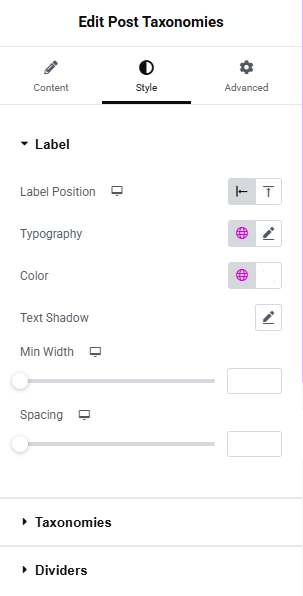
Fig. 2.1. Label Settings.
in the Label tab (fig. 2.1) allows to configure:
- Label Position:Align label to left/Top;
- Typography of label;
- Color of Label;
- Text Shadow;
- Min Width;
- spacing between label and taxonomy;
Taxonomies tab (fig. 2.2) allows to configure:
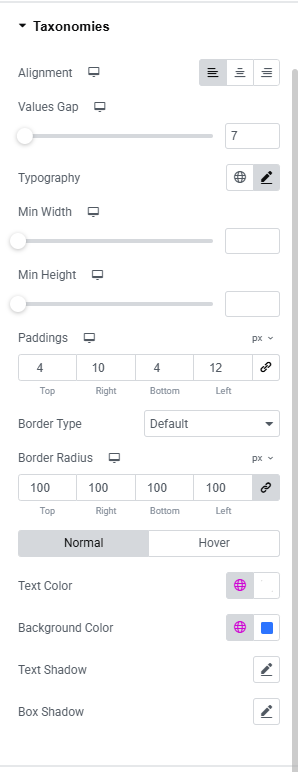
Fig. 2.2. Taxonomies Settings Tab.
- Alignment;
- Values gap: Gap between teh taxonamies;
- Typography;
- Min Width;
- Min Height;
- Paddings;
- Border Type;
- Border Radius;
- Text Color;
- Background Color;
- Text Shadow;
- Box Shadow;
Dividers tab (fig. 2.3) allows to configure:
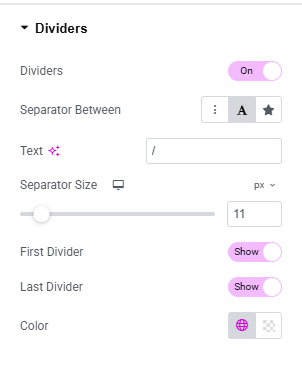
Fig. 2.3. Deciders Settings Tab.
- Enable/disable dividers between the taxonomies;
- Separator Between: select the divider type like divider, text, icon;
- The the option to select the divider/icon as per previous selection;
- Enable/disable first Divider;
- Enable/disable last Divider;
- Color;
Advanced
The Advanced section contains standard Elementor settings. More info is available here.